
Download Marathon Pace Calculator – free Mac running pace tool
Overview of Marathon Pace Calculator
Marathon Pace Calculator is a lightweight, completely free program designed exclusively for macOS users who want to fine‑tune their long‑distance training. Developed by Matti Ropponen, this sports‑category utility transforms a simple finish‑time input into a full suite of pacing metrics, including target marathon pace, split times for each mile or kilometer, and even projected finish times for different race distances. Because the app is native to Mac, it runs smoothly without the overhead of a web‑based converter, offering instant calculations even when you’re offline.
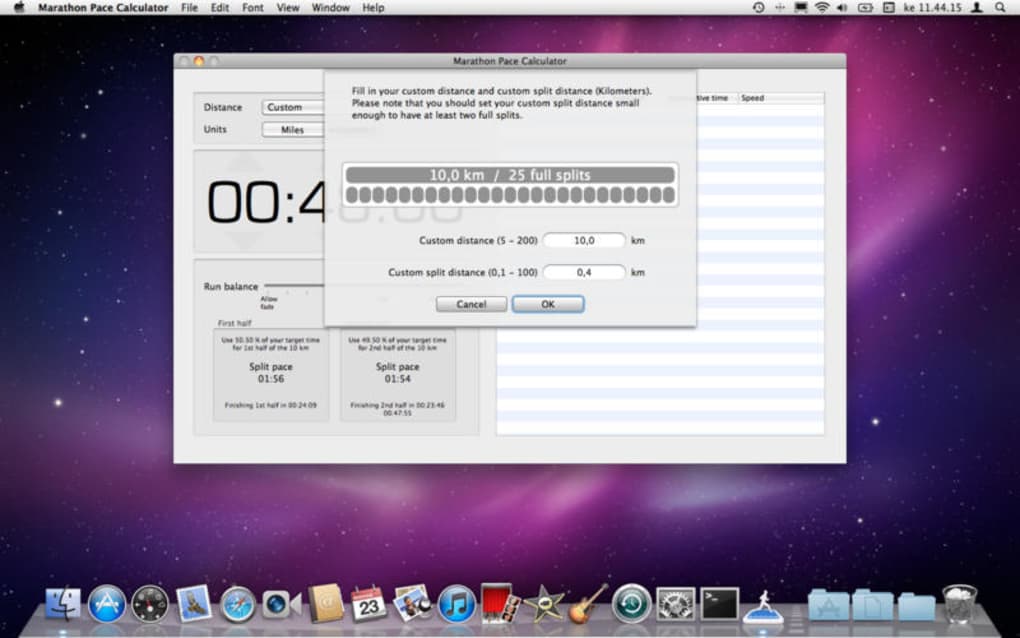
The interface is deliberately minimalist: a clean input field for your goal time, drop‑down menus to select distance units, and a big “Calculate” button that instantly populates a table of splits. While the core functionality is free, the developer continues to release updates that improve accuracy, add support for newer macOS versions, and polish the visual design. Whether you’re a seasoned marathoner planning a new PR or a beginner trying to understand what a realistic goal looks like, Marathon Pace Calculator provides the numbers you need in a secure, ad‑free environment.
The program ships in English, making it accessible to a global audience of runners who prefer a desktop tool over a mobile app.
Key Features and How to Use the Tool
The strength of Marathon Pace Calculator lies in its focused feature set. Rather than overwhelming users with extraneous data, the app delivers exactly what runners need to plan their race strategy. Below is a concise list of the most valuable capabilities, each designed to help you convert a target finish time into actionable pacing information.
- Instant Pace Conversion: Enter a desired marathon finish time and instantly receive your average per‑mile or per‑kilometer pace.
- Split‑Time Table: Generates a detailed table showing cumulative time at each mile or kilometer, useful for monitoring progress during training runs.
- Multiple Distance Support: While built for the marathon (42.195 km), the calculator also handles 5 K, 10 K, half‑marathon, and ultra‑marathon distances.
- Unit Flexibility: Switch between metric and imperial units with a single click, ensuring the app fits your regional preferences.
- Export Options: Save the split table as a CSV file for import into training logs or spreadsheet programs.
- Dark Mode Compatibility: Automatically adopts macOS dark mode, reducing eye strain during late‑night planning sessions.
- Offline Functionality: All calculations are performed locally, meaning you can use the tool without an internet connection.
Using Marathon Pace Calculator is straightforward. Launch the application, then type your target finish time in the format HH:MM:SS. Choose the race distance from the drop‑down menu—by default it is set to “Marathon.” Next, decide whether you prefer splits displayed in miles or kilometers.
Press the bright green “Calculate” button and watch the results appear instantly. The split table scrolls smoothly, and you can copy any row by clicking the adjacent copy icon. For athletes who like to keep a record, click the “Export CSV” button at the bottom of the window; the file will be saved to your Downloads folder, ready for later analysis.
The UI includes helpful tooltips that appear when you hover over each control, ensuring that even first‑time users can navigate the app without consulting a manual.
System Compatibility, Installation Steps, Pros & Cons
Marathon Pace Calculator runs on macOS 10.13 (High Sierra) and later, including macOS Monterey, Ventura, and the newest Sonoma releases. The binary is signed by Apple, guaranteeing that the software passes Gatekeeper checks and can be installed with a single click.
Installation Guide
- Visit the official download page linked from the developer’s website.
- Click the “Download for macOS” button; the file will be saved as
MarathonPaceCalculator.dmg. - Open the DMG file and drag the application icon to your
/Applicationsfolder. - On first launch, macOS will prompt you to confirm that you trust the developer—select “Open” to proceed.
- The app will appear in your Launchpad; click it to start calculating your pace.
Pros
- Completely free with no hidden in‑app purchases.
- Native macOS performance—no lag, no ads.
- Simple, intuitive UI that works for beginners and elite athletes alike.
- Supports both metric and imperial units without extra configuration.
- Exportable CSV output for deeper analysis in spreadsheet tools.
- Regular updates from the developer keep the app compatible with the latest macOS releases.
Cons
- Lacks advanced training features such as heart‑rate zones or VO₂ max predictions.
- No mobile companion app; runners who prefer iPhone calculators must look elsewhere.
- Only available in English, which may limit accessibility for non‑English speakers.
Review Summary: Marathon Pace Calculator delivers exactly what its name promises—a reliable, free, and easy‑to‑use pacing tool for Mac users. While it could benefit from more advanced training metrics, its speed, offline capability, and clean design make it a top choice for anyone planning a marathon or any long‑distance race.
Frequently Asked Questions
-
Is Marathon Pace Calculator truly free?
Yes, the application is completely free. There are no hidden fees, subscription plans, or in‑app purchases.
-
Can I use the calculator without an internet connection?
Absolutely. All calculations are performed locally on your Mac, so you can plan your race pace even in remote training locations.
-
Does the app support dark mode?
Yes. Marathon Pace Calculator automatically follows the system‑wide dark mode setting introduced in macOS Mojave.
-
Can I export my split times for use in other programs?
The tool includes an “Export CSV” button that saves the full split table to a comma‑separated values file, which can be opened in Excel, Numbers, or any spreadsheet software.
-
Which macOS versions are compatible?
The application runs on macOS 10.13 (High Sierra) and later, covering all recent releases up to macOS Sonoma.
Conclusion & Call to Action
Marathon Pace Calculator fills a niche that many runners overlook: a dedicated, no‑frills desktop tool that delivers fast, accurate pacing data without any subscription pressure. Its free price tag, offline capability, and clean macOS‑native design make it a solid addition to any runner’s training toolbox. While power users may crave deeper analytics, the core functionality—converting a target finish time into precise splits—works flawlessly and has earned a strong community rating of 4.5 stars. If you’re ready to take the guesswork out of marathon planning, simply download the app, input your goal time, and let the calculator do the heavy lifting. Start using Marathon Pace Calculator today and run your next race with confidence.
Download Marathon Pace Calculator now and experience a faster, more informed way to train for your marathon.







